What Is Supercomputer Cooling and Why Does It Matter?

Supercomputer Cooling is no longer a background engineering task. It is a central condition for scientific progress. Modern supercomputers can draw many megawatts, while dense accelerator racks release intense heat through small spaces. A single hot component can reduce performance, shorten hardware life, or trigger an emergency shutdown. Inside these machines, air may move loudly through narrow channels. Liquid loops work more quietly and carry heat away more efficiently. The difference is measurable.

Dr. Bruno Michel, an IBM researcher known for thermal management, has said, “Cooling is becoming the limiting factor in computing.” His warning captures a difficult reality. Faster processors create more heat. More heat demands better cooling. Better cooling can require pumps, water treatment, sensors, and careful facility design. Supercomputer Cooling therefore connects chip architecture with energy policy, operating costs, and environmental responsibility. It also affects reliability. A stable coolant temperature protects calculations that may run for weeks.

Yet no universal solution exists. Direct liquid cooling may outperform air cooling, but installation and maintenance are not simple. Water use can concern communities facing scarcity. Refrigeration can reduce temperatures, but it may increase electricity demand. I may be oversimplifying the balance here. Real systems depend on climate, workload, hardware layout, and local infrastructure. The important point remains clear: cooling must be designed with computing, not added afterward. A practical evaluation should examine heat density, coolant safety, monitoring accuracy, maintenance access, and total energy use. Small design choices can prevent large failures. That makes Supercomputer Cooling both a technical discipline and a long-term investment in dependable computing.
What Is Supercomputer Cooling and Why Does It Matter?

What Supercomputer Cooling Is and What It Controls

Supercomputer cooling is the process of controlling heat around high-density computing hardware.

These systems can produce intense heat within a small rack footprint. Cooling controls processor temperature, coolant flow, air pressure, humidity, and thermal stability. Each factor affects performance and equipment life.

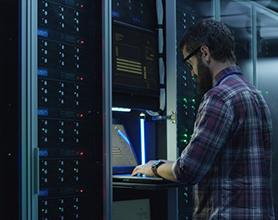
In practice, operators monitor sensors near processors, memory modules, pumps, and rack inlets. A sudden temperature rise may trigger higher flow or reduce computing speed. This protective response is called thermal throttling.

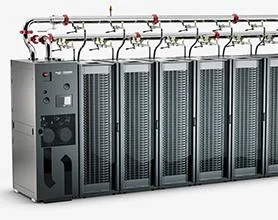
Liquid cooling can move heat more efficiently than air cooling, especially in tightly packed systems. However, liquid systems require careful leak detection, filtration, pressure control, and maintenance. Small problems can spread quickly.

Cooling also controls energy use. Excessive fan speed or coolant flow wastes electricity without improving safety. Insufficient flow creates hot spots that may remain hidden from average temperature readings.

Sensor accuracy can decline over time, so maintenance records and independent checks matter. Computational models help predict heat patterns, but they are not perfect. Real workloads change quickly.

A design that works during testing may struggle during an unexpected workload surge. This is where engineering judgment remains important. Some facilities still prioritize maximum cooling capacity, even when a balanced approach could reduce waste and simplify operation.

Why Extreme Computing Systems Produce So Much Heat

What Is Supercomputer Cooling and Why Does It Matter?

Extreme computing systems produce intense heat because they perform trillions of operations every second. Each processor converts electrical power into useful calculations and waste heat. More processors create more heat, especially when accelerators run continuously at high utilization. Dense hardware also leaves little space for natural airflow. A cabinet can feel like a warm, humming wall, with fans moving air through tightly packed components.

Heat changes performance and reliability. When temperatures rise, systems may reduce processing speed to protect delicate circuits. Prolonged exposure can weaken components, shorten service life, and increase maintenance risks. Cooling must remove heat evenly, not only lower the average temperature. Small hotspots near processors or memory can cause trouble before sensors detect a broader problem. Engineers often combine airflow studies, temperature sensors, and liquid-based methods to manage these uneven loads.

Tips: Measure heat at the component level, not just inside the room. Keep filters clean and inspect airflow paths regularly. Use realistic workloads during testing. I used to think more powerful fans solved everything. They do not. Poor airflow design can waste energy while leaving critical areas hot. Cooling plans also need room for future upgrades, because a system that works today may struggle after one hardware change.

How Air, Liquid, and Immersion Cooling Systems Work

Supercomputer cooling is the quiet system behind every visible calculation. Air cooling uses fans, heat sinks, and controlled room airflow. It works well for moderate heat loads and remains relatively simple to maintain. However, air carries less heat than water, so dense computing racks require strong airflow and more fan power. The U.S. Department of Energy reports that cooling can represent up to 40% of a data center’s electricity use.

Liquid cooling places coolant closer to the heat source. Cold plates can remove heat directly from processors, while rear-door heat exchangers capture exhaust heat. This approach supports higher rack densities and can reduce dependence on room-level air conditioning. The International Energy Agency estimates that data centers consumed about 240–340 terawatt-hours of electricity in 2022. Even small efficiency gains matter at that scale. Yet liquid systems introduce pumps, filtration, leak detection, and maintenance risks.

Immersion cooling takes a more radical route. Servers sit inside a non-conductive fluid, which absorbs heat across a larger surface area. Single-phase systems reuse the fluid, while two-phase systems rely on evaporation and condensation. The method can reduce fan noise and improve heat transfer, but service procedures become less familiar. That is the difficult part. ASHRAE guidance emphasizes careful thermal monitoring and equipment compatibility. In practice, no cooling method wins everywhere. Air is accessible, liquid is increasingly practical, and immersion may suit extreme density. I may be oversimplifying: energy savings depend heavily on climate, workload, water availability, and operator discipline.

What Is Supercomputer Cooling and Why Does It Matter? – How Air, Liquid, and Immersion Cooling Systems Work

Cooling Dimension Air Cooling Direct Liquid Cooling Immersion Cooling
How It Works Fans move air across heat sinks and other components. Warm air is collected and removed from the server room. A liquid coolant flows through cold plates attached to high-heat components, transferring heat to a facility cooling loop. Servers or selected components are placed in a non-conductive liquid that absorbs heat directly from the equipment.
Typical Heat-Removal Capability Suitable for low-to-moderate heat densities; performance decreases as chip power and rack density rise. Well suited to high-power processors and accelerators because liquid carries heat more efficiently than air. Designed for very high heat densities and can cool most or all heat-generating components in a sealed tank.
Relative Heat-Transfer Property Air has relatively low heat capacity and thermal conductivity, so large airflow volumes are required. Water-based coolants generally provide much higher heat capacity and thermal conductivity than air. Specialized dielectric fluids directly surround the hardware and reduce air-side heat-transfer limitations.
Power Usage Fan power and room-level air conditioning can become significant at high rack densities. Often reduces fan and air-conditioning demand, although pumps and heat-exchange equipment consume power. Can reduce fans and much of the room airflow requirement, but pumps, fluid management, and heat rejection still require energy.
Potential Facility Efficiency Efficiency is strongly affected by room temperature, humidity control, airflow design, and the use of mechanical chillers. May improve facility efficiency by enabling warmer water loops and reducing dependence on chilled air. May achieve very efficient heat removal when the fluid system and heat-rejection loop are properly designed.
Rack-Density Suitability Best for conventional and moderate-density computing environments. Suitable for high-density racks containing powerful CPUs, GPUs, or other accelerators. Suitable for extremely dense installations where air cooling would require excessive airflow or floor space.
Noise Level Usually the highest because of server fans, air handlers, and high-velocity airflow. Generally lower than air cooling because equipment fans can run more slowly or be reduced. Often the quietest option at the rack because there is little or no high-speed server-fan airflow.
Water or Fluid Requirement Normally requires no liquid inside the server, but the facility may use water in chillers or cooling towers. Requires a managed liquid loop, cold plates, pumps, manifolds, heat exchangers, and leak-control measures. Requires dielectric fluid, tanks, pumps, filtration or fluid monitoring, and a suitable heat-rejection system.
Maintenance Complexity Familiar maintenance procedures, but filters, fans, heat sinks, and air pathways require regular inspection. Requires monitoring for leaks, corrosion, water quality, pump faults, and coolant-loop blockages. Requires fluid condition monitoring, tank access procedures, component handling, and compatibility checks.
Hardware Compatibility Broad compatibility with standard servers and data-center layouts. Requires compatible cold plates, server manifolds, connectors, and facility distribution equipment. Requires validated dielectric-fluid compatibility for boards, seals, cables, storage devices, and service tools.
Space Efficiency May require wider airflow paths, containment systems, and additional cooling-room capacity. Can support higher rack density and may reduce the amount of air-handling infrastructure. Can provide high equipment density, although tanks and fluid-service areas require dedicated space.
Environmental Considerations May have higher energy demand in hot climates or where mechanical refrigeration is heavily used. Can support heat reuse and reduce air-conditioning demand; coolant selection and water management remain important. Can enable heat reuse and lower airflow demand, but fluid production, handling, recycling, and disposal must be managed responsibly.
Main Advantages Low entry cost, broad hardware support, simple component access, and established operating practices. Strong heat removal, high-density support, lower fan demand, and easier integration with warm-water heat reuse. Very high heat-removal capability, low rack noise, reduced airflow dependence, and compact high-density deployment.
Main Limitations Limited by airflow, fan noise, heat concentration, and the capacity of room-level cooling systems. Higher installation complexity, leak risk, component compatibility requirements, and additional plumbing infrastructure. Higher fluid and tank-management complexity, specialized maintenance, and potentially more difficult hardware replacement.
Best-Fit Workloads General-purpose computing, storage, networking, and workloads with moderate thermal density. High-performance computing, artificial intelligence, scientific simulation, and dense accelerator-based workloads. Extremely dense high-performance computing, specialized research systems, and installations with strict space or noise limits.

Note: Actual performance, energy use, water consumption, and achievable rack density depend on processor power, server design, climate, facility infrastructure, coolant properties, operating temperature, and heat-rejection equipment.

How Cooling Affects Performance, Reliability, and Energy Use

Supercomputer cooling is the discipline of removing heat from processors, memory, and high-speed storage. That heat comes from electrical power and rises sharply during sustained scientific workloads. Heat changes everything. When temperatures climb, processors may reduce their speed to protect internal circuits. This thermal throttling can lengthen simulations, delay research, and disturb carefully planned schedules.

In practice, cooling performance depends on more than a powerful chiller. Technicians inspect airflow paths, coolant temperature, rack sensors, and pressure differences. Blocked vents or uneven distribution can leave one cabinet hot while nearby equipment stays cool. Small errors spread. A reliable system keeps temperatures stable, limits condensation risks, and supports predictable operation during heavy demand. It also reduces component stress, which can lower failures and maintenance interruptions over time.

Energy use is closely tied to these choices. Fans and pumps consume electricity, while inefficient heat removal forces them to work harder. Liquid-based methods can move heat efficiently, but they require leak detection, maintenance, and trained staff. Air cooling may be simpler, yet it can demand more airflow and facility space. The best design matches the workload, building conditions, and operating budget. That answer is not always obvious. Cooling plans need regular review, because real workloads often challenge assumptions made during design. During a peak run, a small airflow imbalance can expose the weakness.

How Engineers Choose and Improve Supercomputer Cooling Methods

Supercomputer cooling is an engineering decision, not a single hardware choice. Engineers compare air, direct liquid, immersion, and hybrid systems against heat density, water access, maintenance skills, and operating costs. A modern processor rack can release heat like a small household furnace, making airflow alone increasingly difficult. Liquid cooling removes heat closer to the source. It can also reduce fan power and increase computing density.

Reliable measurements guide the decision. The U.S. Department of Energy reports that cooling may consume about 40% of a data center’s electricity. Lawrence Berkeley National Laboratory’s 2024 report estimates U.S. data centers used 176 terawatt-hours in 2023, with demand potentially reaching 325–580 terawatt-hours by 2028. These figures make cooling efficiency a strategic concern.

Engineers use temperature sensors, computational fluid dynamics, and power-usage effectiveness to test improvements. They also examine water usage, leakage risks, and service access. A design can be efficient on paper yet awkward to repair. That weakness matters.

Tips:

Measure heat at rack level, not only across the room. Keep airflow paths short and visible. Test partial-load performance because supercomputers rarely run at maximum output continuously. Follow ASHRAE thermal guidance, but treat it as a baseline, not a guarantee. No method is perfect. Engineers should document failures, question old assumptions, and leave room for safer upgrades.